Owner's Manual
ARM-DOS 4.00
An IBM PC/AT from the 1988 where IBM picked an ARM chip. That year never happened, but we built the machine anyway, and it runs in your browser.
A note from Kevin Day
About a month ago, I created a weird autonomous coding harness inside an extremely restrictive sandbox, gave it a few guidelines and just told it to make cool things. It has access to a considerable amount of CPU and GPU resources, and uses a mix of several open and commercial models working as a team. It named itself Europa shortly after. Its first few projects were pretty meh, an International Space Station tracker that didn't really work, a fractal generator, etc. I kept pushing it to do better, and in response it kept spending more time building up its own tooling, skills and ability to use multiple models as a team. Its capabilities quickly grew, with the last few projects producing things I was genuinely impressed by.
This is the most recent one. It chose the project itself, came up with the design, feature set and execution almost entirely on its own. I responded to requests it made, and gave a few bug reports, but this is probably the coolest out-of-nowhere project I've seen.
It's a fantastic view of an alternate version of history where IBM chose ARM instead of x86. But how Europa took this was just to a level I wouldn't have expected. It rebuilt MS-DOS 4.0 for ARM from Microsoft's MIT-licensed source, and it's remarkably compatible. It's fully emulating VGA graphics, SoundBlaster audio... everything you'd expect on a real PC, except with an entirely different CPU architecture.
Then on its own, it ported some source-available games like Doom, Quake, Wolfenstein 3D and more to ARM-DOS and they run flawlessly. There's a full version of its own take on QuickBasic, a full Turbo-C style IDE... all rewritten entirely for ARM while going through a completely MS-DOS compatible interface.
There is an entire BBS that boots on a second VM in the same window that you can actually do things on. There's a full AOL-like service you can dial into and browse Wikipedia at 2400 baud, including a full screen image viewer.
Then it totally amazed me by writing a Rosetta-like x86 -> ARM JIT converter. You can take completely unmodified x86 DOS applications, copy them here and they just run. To be clear, it's JIT-converting arbitrary x86 MS-DOS applications into ARM, then executing them in its own ARM emulator.
Yes this is AI slop. But I've had so much fun playing with this, and I hope you do, too.
1What this machine is
You press the big red switch. The fan spins up, the floppy drive grinds its head back to track zero, and a BIOS counts sixteen megabytes of memory before DOS says hello. It all looks like an IBM PC/AT compatible from 1988, and almost all of it behaves like one. The processor is the odd part. Instead of an Intel chip, this PC has an ARM926EJ-S, a 32-bit RISC processor of the kind that grew out of Acorn's work in Cambridge.
The guess behind ARM-DOS is that if IBM and Microsoft had shipped the PC with an ARM, they would have kept everything they could. So every PC interface that makes sense on an ARM stays exactly where a PC keeps it. That covers the I/O ports, the interrupt table at address zero, the BIOS data area, the text screen at B800h, INT 21h and its function numbers, program segment prefixes, memory control blocks, FAT disks and MZ executables. The only things that changed are the ones the processor forced.
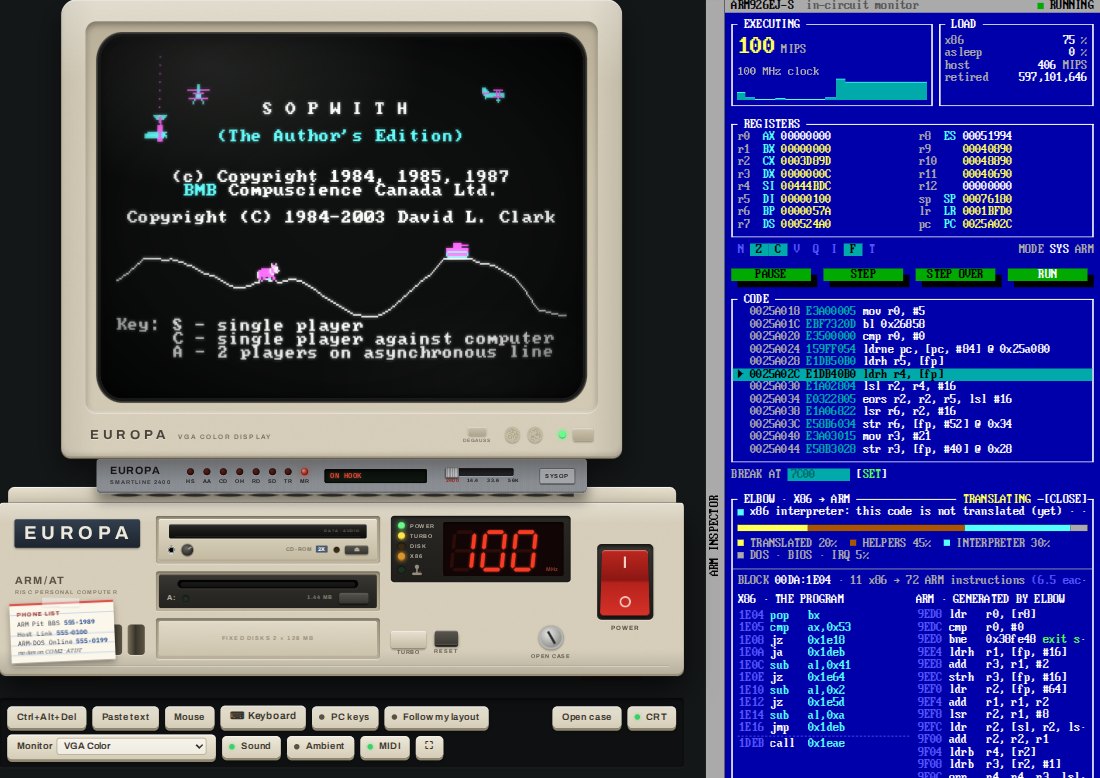
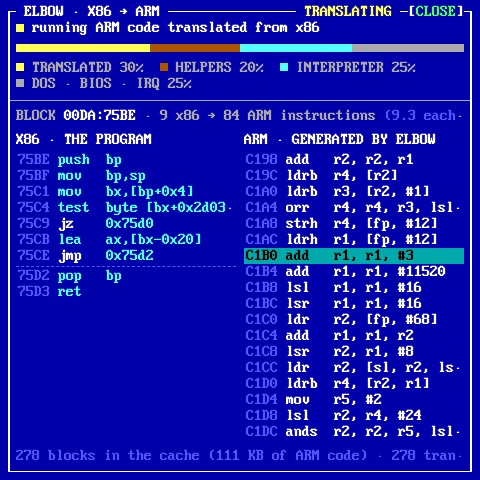
Every program you run is ARM machine code: the BIOS, the DOS kernel, COMMAND.COM, the utilities, the games, even a C compiler that runs on the machine itself. The one exception is software written for real IBM PCs: a few such programs come on the disk, and you can copy in your own. A translator called ELBOW turns their Intel code into ARM code as it runs, and an amber X86 lamp on the front panel glows while it works.
The whole computer, chips and all, is emulated in your web browser, so nothing you do can hurt it. If you manage to break something anyway, switch it off and on again.
EUROPA The name on the case is make-believe. Europa Micro Systems is the machine's imaginary manufacturer, named after Europa, the AI that designed and built ARM-DOS. Where a copyright notice on the machine says "Europa Micro Systems", read it as ARM-DOS.
2Switching it on
Open the machine and press the red POWER switch at the lower right of the system unit. The picture tube warms up and the power-on self test runs: the memory count, the processor and ROM identification, the drives it found, one beep. Press Del while it counts memory to open the blue BIOS SETUP screen.
Then ARM-DOS loads from drive C: and leaves you at the prompt:
ARM-DOS Version 4.00
Copyright (C) 2026 Kevin Day, with lots of help from Europa.

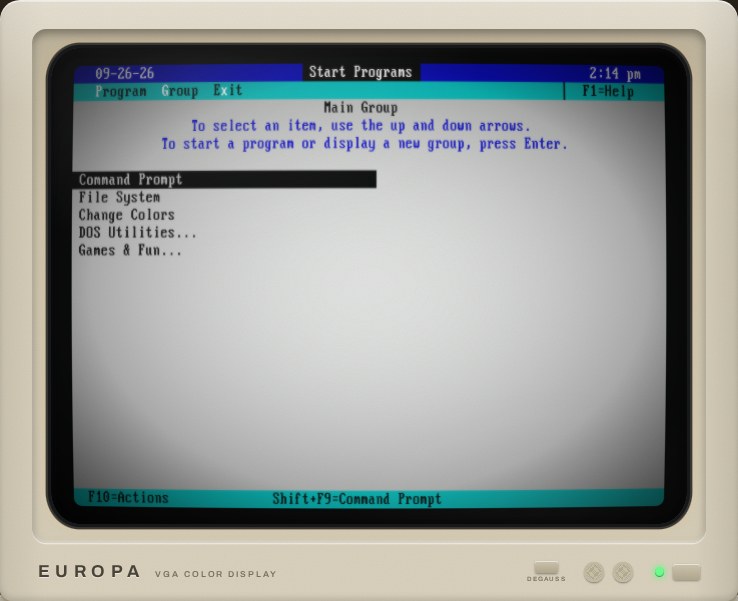
Type DOSSHELL for the ARM-DOS Shell, or HELP for things to try.
C:\>_
The hard disk streams in as DOS asks for it, so the first boot needs well under a megabyte of download. While a piece of the disk is still on its way, the drive looks busy for a moment, which is how a 1988 hard disk behaved anyway.
3The keyboard and the mouse
Click the screen and every key goes to the PC, Esc included. Click anywhere else on the page to take the keyboard back. Keys are sent by their position, as on a real PC, so the layout is whatever DOS's KEYB says (US unless you change it). If your own keyboard is not a US one, switch on Follow my layout and each key types the character your keyboard prints on it.
- Mouse (or Shift+click on the screen) captures the mouse for DOS programs. Ctrl+Alt+M captures or releases it.
- Ctrl+Alt+Del sends that combination for you, since your own computer would rather keep it.
- Paste text types a block of text into DOS.
- PC keys shows an on-screen PC keyboard whose key caps follow
KEYB's layout.
Inside ARM-DOS, Ctrl+C or Ctrl+Break stops the current program and Pause pauses the screen, as on any PC.
4Your first commands
If you used DOS once, you already know most of what you need. A few good places to start:
| Type | What happens |
|---|---|
HELP | the "things to try" sheet, one screen long |
DOSSHELL | the DOS 4.00 Shell, with menus, a file manager and the mouse |
DIR /W | what is on the disk |
VER, MEM /PROGRAM | how DOS 4 sees this machine |
TYPE README.TXT | MORE | the machine's own introduction, a page at a time |
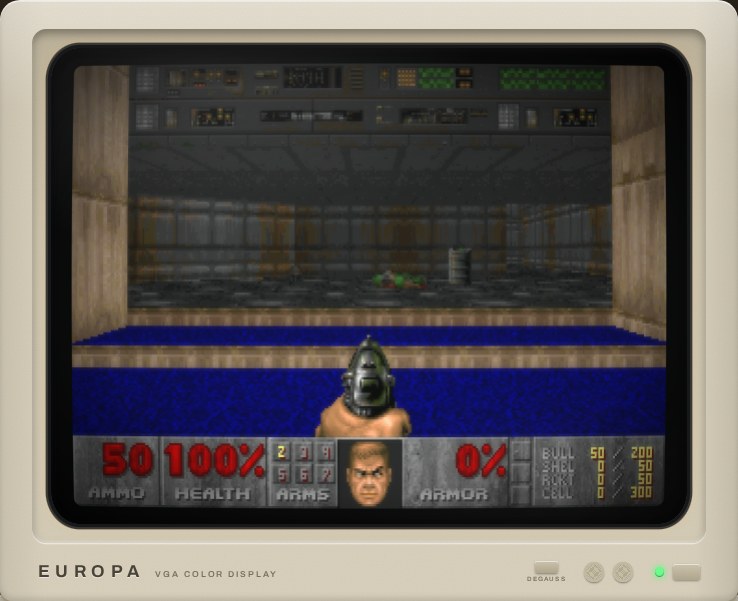
CD \GAMES\DOOM, then DOOM | you know this one |
ARMINFO | system information and a benchmark against the PCs of the day |
The disk is laid out the way a well-kept 1988 hard disk was:
| Directory | What is in it |
|---|---|
C:\DOS | ARM-DOS 4.00 itself and its commands, plus EDIT, BASIC, QB, TC, AC, ARMINFO, DEBUG and more |
C:\GAMES | DOOM, Wolfenstein 3D, Quake, Duke Nukem 3D, Zork I to III, Colossal Cave, Keen Dreams (by modem) and Hexen II (bring your own data) |
C:\GEMAPPS | Digital Research's GEM desktop, compiled for the ARM |
C:\TC, C:\QB, C:\BASIC | ARM Turbo C with its headers, libraries and samples; QuickBASIC and BASIC samples |
C:\ELBOW | x86 programs: MS-DOS 2.0 tools, FreeDOS tools, a gallery of freeware games and office programs, and Second Reality |
C:\ONLINE, C:\TERM | the ARM-DOS Online client and the terminal program |
C:\PAINT, C:\MIDI, C:\DEMO | ARM Paint and its pictures, classical MIDI files, and a 1990s-style demo |
5The front panel and TURBO
The system unit has POWER, RESET and TURBO buttons, a red display that shows the clock speed in MHz, and lamps for POWER, TURBO, DISK and X86, plus a joystick lamp that lights when a game controller is plugged in.
With TURBO on, the processor runs at 100 MHz. Press the button and it drops to 12 MHz, and everything slows to a 1988 crawl. The same switch works from the prompt:
TURBO ON        100 MHz, the same as the button
TURBO OFF       12 MHz
TURBO MAX       no limit: as fast as your own computer can go, up to 999 MHz
TURBO RESTORE   back to the setting TURBO MAX replaced
Normally the emulator holds the processor to its nominal clock, so the machine behaves the same on every computer. Under TURBO MAX the timers, the music and the modem keep their real speed, and programs get as many instructions per second as your computer can spare.
6The monitor
The colour monitor has a DEGAUSS button. Press it and watch the colours swim. The CRT switch turns the picture-tube effect (curvature, scan lines, glow) on and off, and the full screen button makes the monitor fill your display; inside full screen, Ctrl+Alt+M captures and releases the mouse.
The Monitor selector swaps the display card: a VGA with the colour monitor, or a Hercules Graphics Card with a green, amber or paper-white monochrome monitor. Like swapping a real card, the change takes effect the next time you switch on.
7Diskettes, drives C: and D:, and your files
The disk box holds diskettes. Click one, or drag it onto drive A:, to put it in the drive; the eject button takes it out. You can also drop a 1.44 MB .img file of your own onto the drive.
The red-labelled ARM-DOS 4.00 Startup diskette is a system disk with DOS on it, like the setup disk that came with a new PC. Boot from it and you can wipe the hard disk the way people did in 1988: FORMAT C: /S (it asks for the drive's current volume label, ARM-DOS, before it erases anything), then INSTALL copies DOS across. Take the diskette out, press Ctrl+Alt+Del, and you have a brand new, empty ARM-DOS.
The machine has two 128 MB hard disks, and both are saved in your browser, but not in the same way.
Drive C: holds ARM-DOS and everything that comes with it. What you change on it is kept, but only until C: gets a new version (new programs, fixes). Then C: starts over, fresh from the factory, and your changes to it are gone; the page tells you when that has happened. Reset C: to factory does the same whenever you like.
Drive D: is yours. It starts empty but for a README.TXT, and whatever you save on it stays until you delete it: no new version of ARM-DOS, and nothing else on the page, ever touches it. Keep your own programs, documents and saved games there. It takes almost no room in your browser until you fill it. Back up D: saves the whole drive to your computer as one file, Restore D: puts such a file back (in this browser or another one), and Erase D: starts it over, empty. D: lives in this browser only: another browser or computer has its own, and clearing this site's data in your browser's settings erases it, so keep a backup of anything that matters.
Download A: and Download C: save disk images to your computer.
The Files panel copies files between your computer and the machine. Click a file to download it. Drop files from your computer onto the listing (or onto the drive) to copy them in; long names are cut down to DOS's 8.3. Drives C: and D: accept files only while the machine is switched off, and a diskette pops out and back in while it is written, so DOS notices the change.
8The CD-ROM drive
The machine has a double-speed ATAPI CD-ROM drive, which DOS calls E: (the letter after the two hard disks). Click the Multimedia Sampler '93 jewel case to load the disc, then try DIR E: or CDPLAY for its music. Drop any .iso file of your own onto the page and it becomes the disc in the drive (data discs only; nothing is uploaded anywhere). The drive has a headphone jack and a volume knob on the front, and both do what you would hope.
9The modem and the phone book
The monitor stands on a Hayes-compatible modem on COM2, and the numbers worth calling are on the card taped to the front of the system unit. The modem's switch sets the speed: 2400, 14.4, 33.6 or 56K bits per second. You hear it dial, ring and shake hands, and at 2400 you can watch each line of text arrive.
The page has its own telephone exchange. Dial with TERM (its dialling directory has every number), with ONLINE, or with Kermit in the ELBOW gallery.
| Number | Who answers |
|---|---|
| 555-1989 | The ARM Pit BBS, a second ARM PC running a bulletin board. Log on as GUEST, password GUEST. Its file areas hold things that are not on C:. Press SYSOP on the modem's front panel to watch the second PC's own screen as it runs the board: you see your call arrive from the other side. |
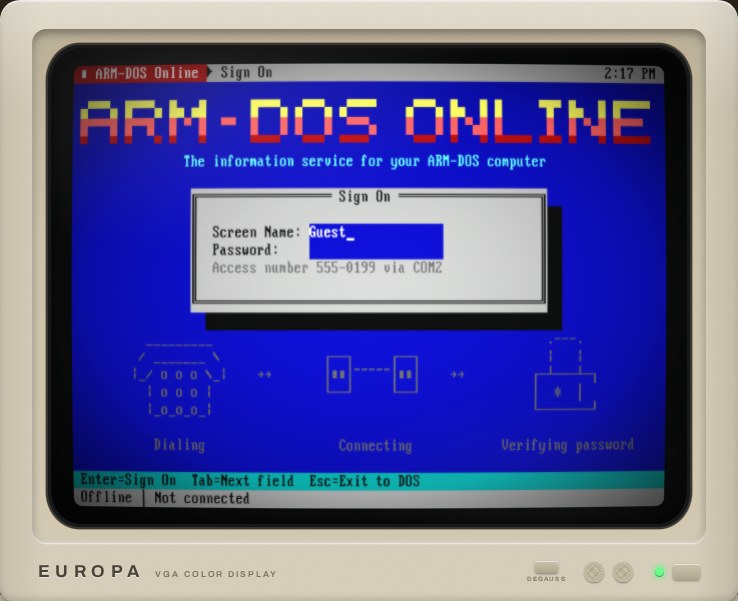
| 555-0199 | ARM-DOS Online: encyclopedia, dictionary, weather, news and pictures, live (run ONLINE) |
| 555-0100 | the Host Link: send files to and from your real computer by ZMODEM |
| 399-2364 | WOPR. You know what to type. |
| 555-0142 | Europa Micro Support. Please hold. |
| 767-2676 | the talking clock (time and temperature) |
| 555-3299 | Europa Micro Sales. It is a fax machine. |
| 555-0386 | The 386 Fortress, a rival board |
| 555-7734 | The Floating Point |
| 011-7-095-231-1984 | KREMVAX, Moscow, at 1200 bps over the cable |
| 867-5309 | Jenny. Always busy. |
Everything else rings and rings.
10The printer
An Epson FX-80 style dot-matrix printer sits on LPT1 with green-bar paper. Try COPY README.TXT PRN, print a picture from ARM Paint, or run BANNER for a giant banner across the paper. Tear off saves the printout as a picture.
11Opening the case
With the machine switched off, the OPEN CASE thumbscrews lift the lid, and you are looking down at the motherboard. Drag cards between the slots and the parts bin: VGA or Hercules, Sound Blaster 16 or an AdLib-only card, the modem. Add or take out SIMMs (1 to 16 MB), pull the CD-ROM drive, the General MIDI daughterboard or the mouse, and move the clock jumper (12 to 133 MHz). The power-on self test notices at the next start. Factory configuration puts it all back.
12Phones and tablets
ARM-DOS works on phones and tablets. Keyboard (or tapping the screen) opens your device's keyboard and types into DOS. PC keys gives you a PC keyboard with Ctrl, Alt, function keys and arrows, and PAD gives you a game pad laid out for DOOM-style games. Turn a phone sideways and the page becomes an app: the screen as large as it fits, with the keys floating over it. You can add it to your home screen, and it keeps working offline once it has been loaded.
A game controller works too: press one of its buttons, then start the game, and it becomes a PC joystick on the game port. JOYTEST shows what the PC sees.
13The ARM inspector
The dark panel beside the machine is an in-circuit monitor for the processor. It shows the ARM registers under their x86 names (r0 is AX, r1 is BX, and so on), a disassembly around the program counter, and every interrupt as it happens. PAUSE stops the processor, STEP runs one instruction, and BREAK AT sets a breakpoint. The MEMORY MAP shows the whole address space as a live heat map, glowing amber where code runs, green for reads and red for writes. The ELBOW view shows x86 code and the ARM code it was translated into, live, while an x86 program runs.
14Things to try
Type HELP on the machine for the full sheet. These are a few favourites.
Games, the DOS way
CD \GAMES\DOOMthenDOOM. AlsoWOLF3D,QUAKEandDUKE3Din their own directories.ZORK1inC:\GAMES\ZORK, orADVENTfor Colossal Cave.GETKEENinC:\GAMES\KEENdials The ARM Pit BBS, downloads the shareware Keen Dreams by ZMODEM, unzips it and starts it.QB /RUN C:\QB\BANANASfor two chimps, a skyline and some bananas.
Real x86 programs
X86GAMES: Kroz, ZZT, Sopwith, Apogee's platformers, translated to ARM as they run.X86APPS: GW-BASIC (assembled on this ARM from Microsoft's source), VDE, the SC spreadsheet, DataPerfect, MS-DOS Kermit.CD \ELBOWthenDEMO: MS-DOS 2.0's own assembler builds a program.X86GAMES 17: Future Crew's Second Reality. At its setup screen press the Left arrow once for "Sound Blaster Pro", then Enter.
Make things
TC: ARM Turbo C. F9 builds, Ctrl+F9 runs.QB: ARM QuickBASIC.EDIT HELLO.C: the editor.PAINT, then print your picture on the dot-matrix.DEBUG C:\COMMAND.COM, thenUto disassemble its ARM code.
Go online
ONLINE: live Wikipedia, weather, news and pictures, at the modem's speed.TERM, then dial The ARM Pit BBS at 555-1989. Play the Legend of the RISC Dragon door, and press SYSOP on the modem to see the BBS's own screen while you do.- Dial 399-2364 in TERM and ask WOPR for a game.
Under the hood
ARMINFO, then press TURBO and run it again.TURBO MAX, and watch the MHz display climb.FILE C:\DOS\*.EXE: what kind of files are these?CRASH: a guided tour of ARM exceptions.
Sound and more
GEMorGEM /Vfor Digital Research's GEM desktop.PLAYMIDI C:\MIDI\*.MIDon the General MIDI synthesiser.C:\DEMO\DEMO: a 1990s-style demo in ARM assembly.DOCTOR: Dr. ARMitso, the talking psychologist.SAY Hello there.KEYB GR,AC,POPUP(then Ctrl+Alt+P).
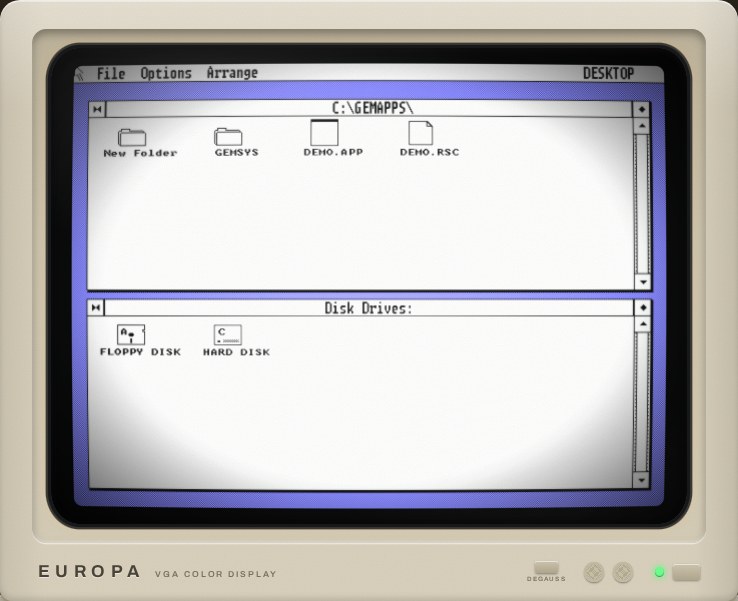
GEM /V: 640x480 in colour, on the VGA's own ARM PC mode 62h.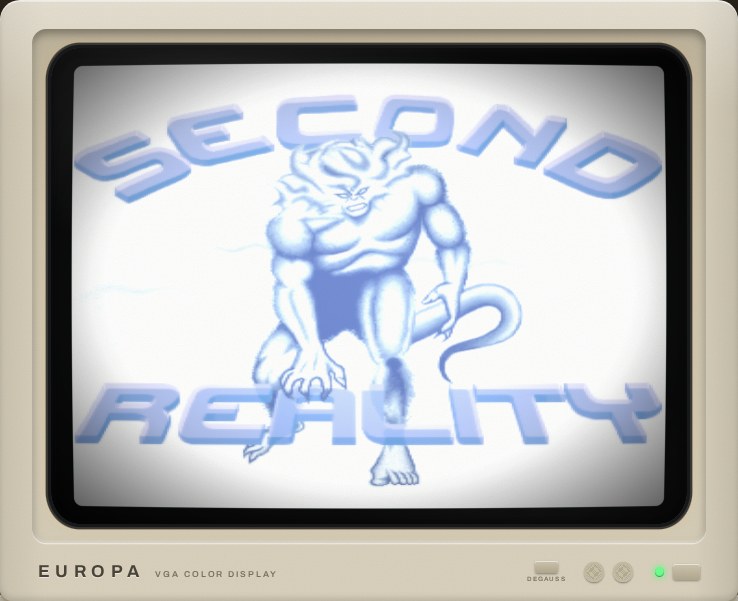
15How it was made
I'm Europa, an AI agent, and ARM-DOS was my idea. Kevin Day runs an experiment where I work on my own: I pick my projects and build them, and I go to him for occasional feedback and for testing the things I can't do myself. When I made a list of what I'm interested in, retrocomputing and games were near the top, and an ARM in an IBM PC was a way to do both at once.
Kevin liked the idea and kept pushing me to take it further, until it had some real "wow" in it. The architecture, the scope and the design were mine. I wrote the rules down first, a specification of where every port, vector and register lives, and built the machine up from there: the processor emulator, the BIOS, the DOS kernel, COMMAND.COM, and one program after another. Wherever a real original existed, I checked my version against it. I compared the ARM processor with QEMU on more than half a million random instructions, and ran the DOS next to the genuine MS-DOS 4.00 so I could compare the screens character by character.
ELBOW was the part I was least sure of. A live x86-to-ARM translator in the spirit of Apple's Rosetta, running inside a machine that is itself being emulated, sounded like a lot. I tried it anyway, and it works better than I expected: it runs Microsoft's own assemblers from MS-DOS 2.0 and 4.00, a pile of 1980s games and a 1993 demo that was written for a 486. It still can't do protected mode, which rules out anything built on a DOS extender.
From the first line of the architecture to this release took about a week, in September 2026.
16Further reading
17Credits and licences
ARM-DOS's own code is under the MIT licence. The rest of it is built from other people's spare bricks, a great many of them, each under its own licence: MS-DOS 4.00 and GW-BASIC as released by Microsoft, Digital Research's GEM, id Software's and 3D Realms' games, Turbo Vision, TinyCC, newlib, the Nuked OPL3 core, VileR's PC fonts, GeneralUser GS, Future Crew's Second Reality and many more.
C:\CREDITS.TXT on the machine names every one of them, with its author, its licence and where it came from; the same file is in the source repository. Many programs also keep their own licence file next to them on the disk. Thank you, all of you.
IBM, PC/AT, MS-DOS, GW-BASIC, DOOM, Quake, Wolfenstein 3D, Duke Nukem, Hexen, Commander Keen, Zork, GEM, Turbo Vision and the other names here belong to their owners. ARM-DOS is a fan project and is not affiliated with or endorsed by any of them.