Technical note
ELBOW
Emulated Legacy Binaries On Workstation: how an ARM PC runs software written for Intel chips, by translating it into ARM code on the fly.
Type the name of an old IBM PC program at the ARM-DOS prompt and DOS notices the file is x86 code. It hands the program to ELBOW.EXE, much as Windows NT started its DOS box for a DOS program. ELBOW gives the program an Intel processor, a megabyte of PC memory, a BIOS and DOS to talk to, and then runs it. The amber X86 lamp on the front panel glows while it does. If you are curious, open the inspector: its ELBOW view shows the x86 instructions side by side with the ARM code they became.
C:\>ELBOW [/JIT | /NOJIT] [/STATS] [/MEM:n] [/NOEMS] program [parameters]
You rarely need to type ELBOW yourself. X86GAMES opens the gallery of x86 games, X86APPS the office programs, and CD \ELBOW followed by DEMO shows Microsoft's MS-DOS 2.0 assembler and linker building a program on the ARM.
1What an x86 program gets
A processor. An 8086, 80186 and 80286 in real mode, plus the 80386's real-mode extensions: 32-bit registers and operand and address size prefixes, FS and GS, the two-byte 0F opcodes (near conditional jumps, SETcc, MOVZX/MOVSX, bit tests, SHLD/SHRD and friends), and the 486's BSWAP, XADD and CMPXCHG. It identifies itself as a 386. There is no floating-point unit, so the usual FNINIT/FNSTSW probe reports none.
Memory. A megabyte plus 64 KB of x86 memory, carved out of the machine's extended memory. Of that, 640 KB is conventional memory, with its own chain of DOS memory control blocks. Page tables with 256-byte pages map the x86 program's video memory at A0000h-BFFFFh and its BIOS data area onto the machine's real ones, so a program that writes to B800:0000 writes the real screen, and one that reads 40:17 sees the real keyboard flags. There is 2.5 MB of LIM EMS 4.0 expanded memory as well, with its page frame at E000h.
DOS and the BIOS. An x86 program's INT 21h is translated into an ARM-DOS INT 21h: the x86 registers go into the ARM registers that stand for them, and every segment:offset pointer becomes the flat address of that x86 location. File handles are ARM-DOS handles, so files, devices, redirection and pipes are the real ones. Memory allocation, interrupt vectors, program segment prefixes and EXEC are handled inside the x86 world. An x86 program can start another x86 program, which runs nested in the same box, or an ARM program, which goes to the real ARM-DOS. The BIOS services (video, disk, keyboard, mouse, printer, time) work the same way.
Ports and hardware interrupts. IN and OUT reach the machine's real ports, so a program can program the VGA's registers and palette, the timer and the speaker directly. The hard part is hardware interrupts. Games hook the timer and the keyboard and expect their own handlers to run; TSRs hook them and chain to the BIOS. ELBOW takes the ARM interrupt and, if the x86 program has hooked that vector, raises it inside the x86 world at the next instruction boundary. It holds back the end-of-interrupt, the way an 8259 holds an interrupt in service. The program's handler then reads port 60h, sends its own EOI or chains on, as it would on a PC. Both styles of handler work, and so does Kermit's serial port handler on the modem.
Sound Blaster DMA. The x86 memory is 128 KB aligned, so ELBOW only has to adjust a program's writes to the DMA page registers. Address and count registers pass through untouched, and Sound Blaster music plays.
2The translator
ELBOW has two engines. The interpreter decodes and executes one x86 instruction at a time. The translator, which is the default, turns hot x86 code into ARM machine code and runs that; a block counts as hot the second time its start address comes up. Rare instructions still fall back to the interpreter.
Superblocks and chaining
The translator follows unconditional jumps as it goes and turns conditional jumps into side exits, so the body of a loop becomes a single block whose back edge branches to its own entry. Each exit to a known address is an ARM LDR pc, [pc, #lit] through a literal. That literal first points at a small stub that asks for the target; once the target block is translated, the literal is patched to point straight at it. After a while the hot code runs from block to block without coming back to C at all. RET and indirect jumps look the next block up without leaving translated code either.
Flags for free
Every x86 arithmetic instruction sets flags, and most of them are never read. ELBOW does 16-bit arithmetic on values shifted into the top half of an ARM register (and 8-bit arithmetic in the top byte). That way, the ARM's own N, Z, C and V flags are the x86 sign, zero, carry and overflow flags (the ARM's carry is inverted after a subtraction, which the translator accounts for). A CMP followed by a conditional jump becomes one ARM compare and one conditional branch.
For the cases where a later instruction, a helper or the interpreter might want the flags, each flag-setting instruction also records its operands with one store-multiple instruction. A liveness pass removes even that store when it can prove nothing reads the flags before the next flag setter. INC and DEC, which leave the carry alone, recover it from the ARM flags or the recorded state.
Memory and self-modifying code
Loads and stores do their page-table lookups inline. Pages that hold translated code are tagged in the write table, and a store to one of them is checked against a byte-by-byte map of translated code. If it really hits, the affected blocks are thrown away and the current block ends, so self-modifying code works, even when a program patches the very next instruction. Data that DOS loads into x86 memory (a program being EXECed, a file being read, a disk sector) invalidates translations in the same way.
What is translated
Moves, the ALU, shifts by constants, INC/DEC, TEST, NOT, NEG, multiplication and division, LEA, pushes and pops, string instructions, far calls, jumps and returns, LES/LDS, PUSHA/POPA, IN/OUT, and the 386 forms of most of these with 32-bit operands. Shifts by CL, rotates, multiply and divide call the interpreter's routines from translated code; REP MOVS and REP STOS copy in page-sized runs. Instructions like INT, IRET, STI and POPF end a block and go to the interpreter. Teaching the translator the 386 instructions took Second Reality from 11% to 66% of the processor's time spent in translated code.
The code cache
Translated code lives in a 2 MB cache, found through a chained hash table. When it fills up, ELBOW empties it and starts over. An earlier, smaller cache with a direct-mapped table made Microsoft's MASM 5.10 retranslate its own code thirty times over; the current one assembles the same module five times faster.
3The double JIT
The ARM926 processor underneath ELBOW is itself emulated, and its emulator has its own just-in-time compiler that turns hot ARM code into JavaScript. So a DOS game from 1988 goes through two compilers on its way to your screen: ELBOW translates its x86 code into ARM code, the emulator compiles that ARM code into JavaScript, and your browser's JavaScript engine compiles the JavaScript into the native code of whatever computer you are using.
When ELBOW patches a chained exit or drops a block, those are stores into ARM memory like any other, and the emulator throws away the JavaScript it compiled from the old bytes. The two layers never need to know about each other.
4Watching it work
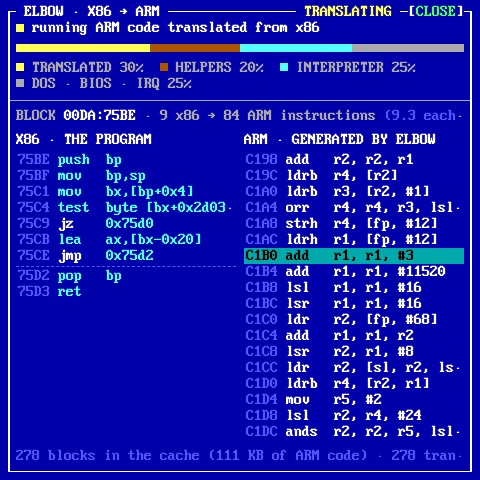
When it starts, ELBOW writes the address of a small table describing its state to four ports on the system board (FCh-FFh), and clears the address when it ends. The page's inspector reads that table out of the machine's memory. About ten times a second it samples the ARM program counter, finds the translated block it is in, and shows that block's x86 instructions next to the ARM code made from them, with the lines the processor was seen on glowing. It holds on to the busiest block for a second or two so a loop stays on screen. The bar above says where the time goes: translated code, ELBOW's helpers, the x86 interpreter, or DOS, the BIOS and interrupts. ELBOW does no extra work for any of this, and the view costs nothing while it is closed.
5How fast it is
Measured with the emulated ARM926 at its nominal 100 MHz. BENCH is the same C program compiled twice, once with Open Watcom for 16-bit x86 and once with gcc for ARM, which gives ELBOW a fair race against native ARM code.
| Workload | Interpreter | Translator | Native ARM |
|---|---|---|---|
| sieve (loops per second) | 7 | 73 | 731 |
| CRC-16 | 4 | 60 | 452 |
| mode 13h fill | 1 | 21 | 311 |
memcpy (REP MOVSW) | 2,606 | 2,828 | 4,422 |
FIRE.COM (frames per second) | 3 | 10.7 | — |
| average against native ARM | 132× slower | 8.4× slower | 1× |
In practice that is plenty for the software of the day. Kroz and Sopwith run at nearly six million x86 instructions a second with 99% of their time in translated code, and the timer-paced games run at their intended speed. Second Reality spends 85% of its time in translated code, at about twelve ARM instructions per x86 instruction, and that makes the 100 MHz ARM PC roughly a 386DX-33. Future Crew wrote the demo for a 486-33, so, just as on a real 386, a few heavy scenes arrive late for their cue in the music. TURBO MAX, or the 133 MHz clock jumper inside the case, lets it keep up.
6What runs
- MS-DOS 2.0's tools (Microsoft's MIT-licensed release): MASM, LINK and EXE2BIN assemble, link and build a working
.COMfile on the ARM; DEBUG, EDLIN, SORT, FIND and MORE work with redirection and pipes. - GW-BASIC, built on the ARM. Microsoft's 1983 source, assembled by MASM 5.10 and linked by LINK 3.65 from the MS-DOS 4.00 release, all running under ELBOW: 38 modules in about 80 seconds, producing the same
GWBASIC.EXEbyte for byte every time. - The game gallery, unmodified binaries from their rights holders' free releases: the Kroz series, Beyond the Titanic, Supernova, Word Whiz, Arctic Adventure, Monuments of Mars and Pharaoh's Tomb from Apogee; ZZT 3.2 with its editor; Sopwith, the Author's Edition.
- Office programs: VDE, the SC spreadsheet, DataPerfect and MS-DOS Kermit, which dials the BBS on the ARM PC's modem through its own serial interrupt handler.
- Second Reality by Future Crew, from start to end with music: its own EXE loader, Mode X, EGA planar graphics, a timer-driven "copper", and Scream Tracker music played from EMS through the Sound Blaster.
- FreeDOS TREE, FIND, MORE and CHOICE, with their errorlevels coming back through ELBOW.
To be sure the translated code computes exactly what an Intel chip computes, 7,800 test cases over about 330 instruction patterns run twice: once as a DOS program under ELBOW and once as a Linux program on the host's own x86 processor. Results and flags have to match, for both engines.
7Limits
- No protected mode, so no DOS extenders. A program that switches into protected mode ends with a message.
- No floating-point unit, and no XMS for x86 programs (EMS is there).
- No Gravis UltraSound. Programs that offer it should be told to use a Sound Blaster (Second Reality: Sound Blaster Pro).
- A TSR started at the top level ends when ELBOW ends.
- Some old programs need a nudge, which ELBOW gives them itself: EXEPACKed programs are loaded above the first 64 KB, as
LOADFIXdid, and MS-DOS 2.0's MASM and LINK get 512 KB, since they break with more memory free.